

Search is no longer limited to traditional search engines. Users increasingly discover businesses through AI-powered platforms such as ChatGPT, Google Gemini, and Perplexity. These platforms recommend websites, reference information, and influence purchasing decisions.
For businesses investing in Answer Engine Optimization (AEO) and Generative Engine Optimization (GEO), understanding this traffic is essential.
Google Analytics 4 (GA4) helps identify visitors arriving from AI assistants, evaluate their engagement, and measure their contribution to business goals.
What Is AI Referral Traffic?
AI referral traffic refers to website visits generated when users click links shared by AI-powered assistants.
For example, someone might ask ChatGPT, “Which companies provide industrial automation solutions?” If the AI response links to your website and the user clicks it, GA4 may identify that visit as AI-generated traffic.
Recognizable sources include:
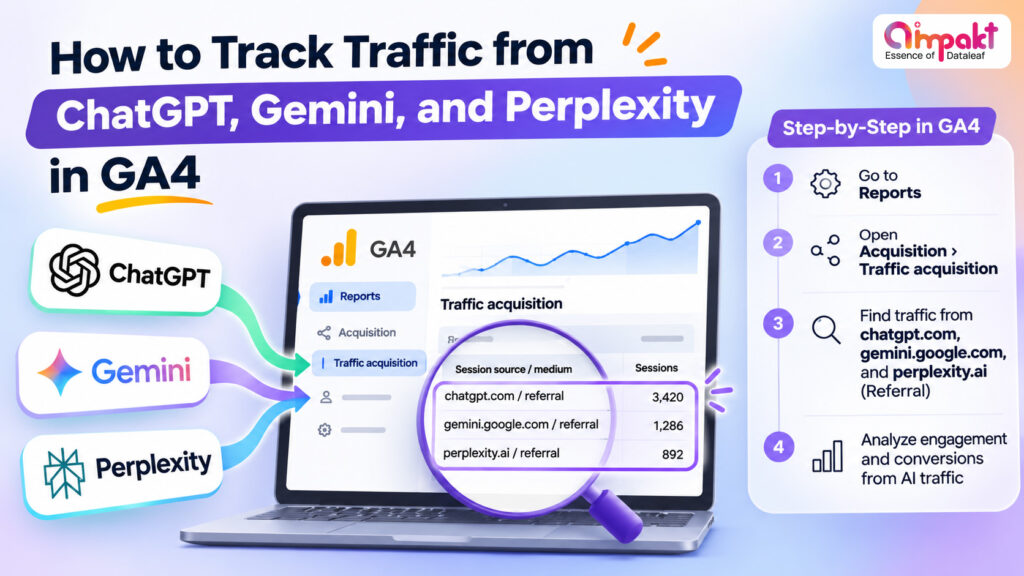
- ChatGPT: chatgpt.com
- Google Gemini: gemini.google.com
- Perplexity: perplexity.ai
These sources help businesses understand which AI platforms are driving website discovery.
How to Track AI Traffic in GA4: Step-by-Step
Step 1: Open the Traffic Acquisition Report
Sign in to Google Analytics 4 and navigate to:
Reports → Acquisition → Traffic Acquisition
Select the Session default channel group and look for the AI Assistant channel.
Introduced in May 2026, this channel automatically categorizes traffic from recognized AI assistants, simplifying AI referral tracking.
Step 2: Identify Individual AI Platforms
Change the report’s primary dimension to Session source/medium.
Look for sources such as chatgpt.com, gemini.google.com, and perplexity.ai.
This helps distinguish platforms driving meaningful visits rather than viewing all AI traffic as one category.
Step 3: Create a Custom AI Traffic Report
For more detailed reporting, navigate to:
Explore → Free Form
Add dimensions such as:
- Session source
- Landing page + query string
- Device category
Include metrics such as sessions, engaged sessions, key events, and revenue.
Apply a source filter to isolate AI platforms and compare their performance over time.
Step 4: Configure Custom Channel Groups
Navigate to Admin → Data Display → Channel Groups.
Create a custom channel group with an AI Assistants category using source-matching rules.
Include verified AI referral domains and position the custom category above broader referral rules.
This helps capture identifiable AI referrals that may not appear in GA4’s default AI Assistant channel.
Which GA4 Metrics Should You Monitor?
Tracking visitor numbers alone does not explain business value.
Focus on:
- Sessions: How much identifiable traffic AI platforms generate.
- Engagement Rate: Whether visitors interact meaningfully with your content.
- Landing Pages: Which articles or service pages attract AI referrals.
- Key Events: Enquiries, form submissions, purchases, or other valuable actions.
For example, a technical guide generating fewer visits but more qualified enquiries may offer greater business value than a high-traffic informational page.
Can GA4 Track Every AI-Generated Visit?
Not completely.
Some AI applications do not pass referral information, causing visits to appear as Direct traffic. Google’s AI Overviews and AI Mode clicks are generally classified under organic search rather than the AI Assistant channel.
Therefore, GA4 measures identifiable AI-referred visits, not total AI search visibility.
Why AI Traffic Tracking Matters for AEO and GEO
AI traffic insights reveal which content attracts users from conversational search.
Businesses can use these findings to strengthen structured content, answer specific customer questions, improve technical accuracy, and develop authoritative resources.
Combining GA4 analytics with AEO and GEO strategies helps connect AI visibility with measurable business outcomes.
Want to understand how ChatGPT, Gemini, and Perplexity contribute to your website traffic?
Contact Us to explore GA4 tracking, AI search visibility analysis, and data-driven AEO and GEO strategies that turn emerging search opportunities into measurable business growth.